Word Search Maker
Type your own words or pick one of 83 topics, then solve the word search on screen or print it with an answer key.
Recent
Your last 10 settings, saved only in this browser. Nothing is uploaded.
Popular tools
- Word Search OnlineFind the hidden words on screen: click or tap the first and last letter of each word, then press Next puzzle.
- Hard Word Search PuzzlesExpert puzzles with long words in all 8 directions and look-alike filler letters, to solve on screen or print.
- Halloween Word SearchSpooky words hidden in a grid – easy for kids or hard for adults, to print or play online.
A word search is a grid of letters with words hidden inside it, running across, down, or diagonally. This word search maker builds one from your own words or from ready-made topics, so you can create a custom word search in a few minutes. It runs free in your web browser with no sign-up and no download, and your words are not uploaded anywhere.
You can play the puzzle on screen, or print it with answer keys for a class, a party, or a quiet activity at home. Choose a grid size and a difficulty, and the maker places every word and fills the empty squares with random letters. Each new puzzle is a different arrangement, so you can make as many as you need.
The puzzles are yours to use at home, in class or in products you sell, such as KDP puzzle books and Etsy printables.
How to use the word search maker
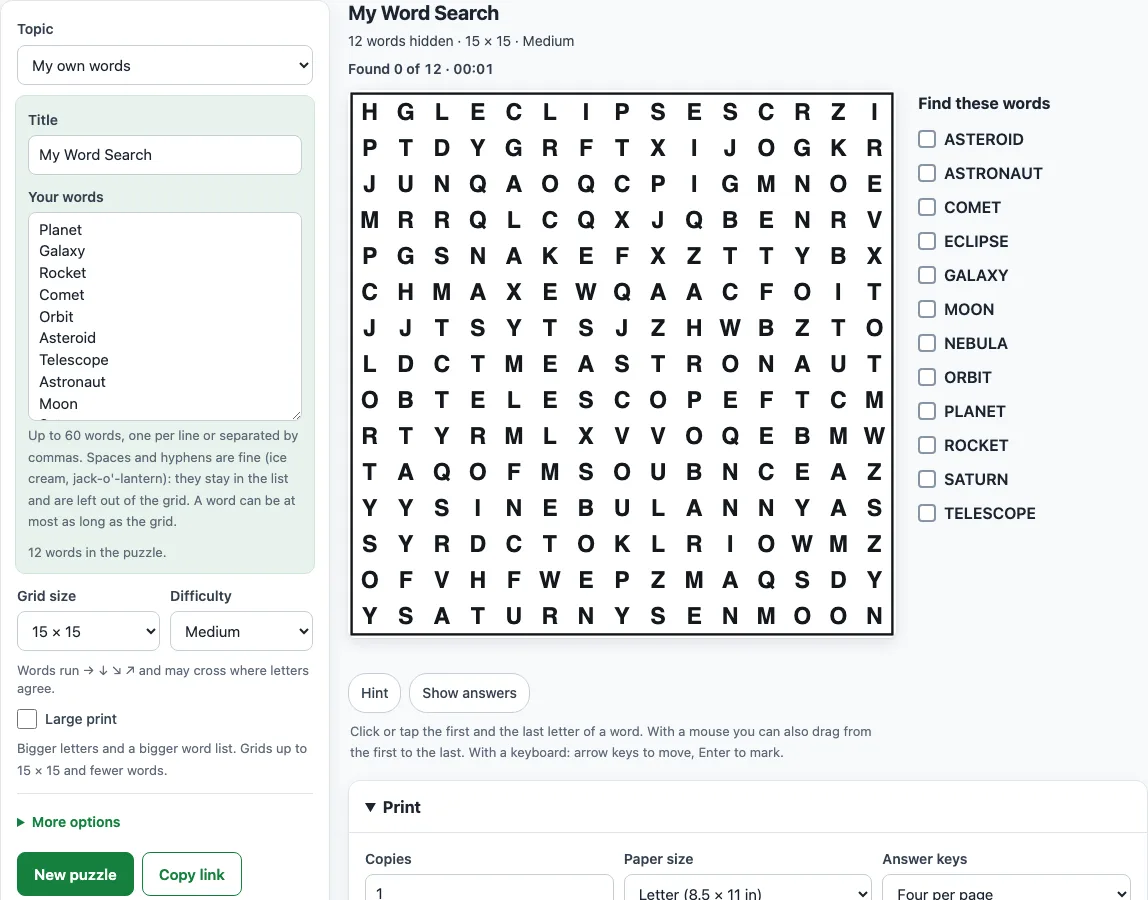
- Open the home page. ‘My own words’ is already selected, with 12 sample words. Click into the ‘Title’ box and type a name for your puzzle.
- Click into the ‘Your words’ box and type over the sample. Put one word per line, or separate words with commas or semicolons. You can enter up to 60 words.
- Choose a ‘Grid size’ from 8×8 to 30×30. Choose a ‘Difficulty’: Easy, Medium, Hard or Expert.
- Check the ‘Left out’ list below the words. It shows any word that was too long, too short or repeated, with the reason.
- Play on screen. Click or tap the first letter of a word, then its last letter. Use ‘Hint’ or ‘Show answers’ if you get stuck.
- To print, open the ‘Print’ panel. Set ‘Copies’, ‘Paper size’ and ‘Answer keys’, then press ‘Print puzzles + answer keys’.
Open ‘More options’ to change the letter case, the word list order, or to hide the word list. Use ‘Copy link’ to share the exact same puzzle with someone else: the link holds the settings, the seed and your words. ‘New puzzle’ keeps your words and makes a new arrangement. Your game is saved in this browser, so reloading the page continues where you left off.
How do I make my own word search?
Type your words into the ‘Your words’ box, and the maker builds the grid from that list. Spaces, hyphens and apostrophes stay in the list but not in the grid, so “ice cream” is hidden as ICECREAM. Accents are removed in the grid, so café becomes CAFE.
A word needs at least 2 letters and can be no longer than the grid. Any word that breaks these rules is listed under ‘Left out’ with the reason, so you can fix it and try again.
How big should the grid be?
A grid should be at least as wide as your longest word. For 10 to 15 words, a 12×12 or 15×15 grid is usual. For 25 words or more, use 20×20 or larger.
The ‘Number of words’ starts at a sensible amount for each size, such as 14 for 12×12 and 18 for 15×15. You can change it, and if your topic has fewer words that fit the grid, the maker uses all that fit and says so.
Can I make a word search with names?
Yes. Type the names of a class or a family, one per line. Names work like any other word, so Mary Ann is hidden as MARYANN.
Check the ‘Left out’ list after you enter names. A name with only one letter is too short, and a name longer than the grid will not fit.
How do I add a hidden message?
Open ‘More options’ and type up to 40 characters into ‘Hidden message’. The letters fill the first empty squares, reading left to right and top to bottom.
After the solver finds every word, the first leftover letters, read the same way, spell the message; any squares after it hold ordinary filler letters. The answer key shades those squares, so the message is easy to check.
How do I make it easier for young children?
Choose Easy, a 10×10 grid, and short words. Easy places words only left to right and top to bottom, and they never cross, which makes them easier to follow.
You can also choose lower case in ‘Letter case’ if children are learning lower-case letters. For very young readers, keep the word list short.
Frequently asked questions
Is the word search maker free? Do I need to sign up?
It is free, and you do not need to sign up. The maker runs entirely in your web browser, and there is nothing to download.
Nothing you type is uploaded. Your own words stay in the browser, and a copied link keeps them after the # sign.
Can I print it with an answer key?
Yes. In the ‘Print’ panel, choose ‘Answer keys’ as Four per page, One per page, or One per page with word positions (what that adds). Press ‘Print puzzles + answer keys’ to print both, or ‘Print answer keys only’ for just the solutions.
Each puzzle prints on its own page, with Name and Date lines and the words with checkboxes. The answer keys follow, with every word outlined. For a PDF, choose ‘Save as PDF’ in the print window.
Does it work on a phone or tablet?
It works in a web browser, so it opens on a phone or tablet as well as a computer. On a touch screen, tap the first letter of a word and then its last letter to mark it.
How do I find hidden words faster?
Start with words that have an unusual letter (Q, X, Z, J, K) or a double letter (OO, LL, SS) and look for that letter first. Then check the 8 squares around each match for the second letter. Find the longest words first, then cross each one off as you go.
Why was a word left out?
A word is left out if it has fewer than 2 letters, is longer than the grid, or appears twice in your list. The ‘Left out’ list gives the reason beside each word.
Can someone else open the same puzzle?
Yes. Press ‘Copy link’ to copy an address that holds your settings and seed. Anyone who opens it gets the exact same puzzle, which suits a class or a newsletter.
Is this the same as a word sleuth maker or a word hunt maker?
Yes. Word sleuth, word hunt, word seek and find-a-word are other names for a word search, so this is also a word sleuth maker, word hunt maker, word seek maker, word search builder and word find creator. Use it to create your own wordsearch, a personalized word search with names, or word search worksheets for a class.
Can I sell word searches made with this maker on Etsy or in a KDP book?
Yes. Everything you make is royalty-free for personal, classroom and commercial use, including KDP puzzle books, Etsy printables and Teachers Pay Teachers. No credit is required. You may not copy the maker itself to run a competing service.
Related tools
In season now: the Halloween word search, then the Thanksgiving word search and the Christmas word search.
- Printable word search puzzles — use this when you want paper copies to hand out or print at home.
- Word search online — use this when you want to solve puzzles on screen without printing.
- Word search for kids — use this for easier grids and shorter word lists for children.
- Hard word search — use this when you want backwards and crossing words for experienced solvers.
- Large print word search — use this when the letters and word list need to be bigger to read comfortably.
- Christmas word search — use this for a festive puzzle with ready-made winter and holiday words.
- Halloween word search — use this for a spooky puzzle with ready-made autumn and Halloween words.
- Word search puzzles for adults — use this for more challenging topics aimed at grown-up solvers.
- Word search solver: use it when you already have a puzzle from a book or worksheet and want the words found.
- Daily word search: use it when you want one new puzzle each day, the same for everyone, with the last 7 days to catch up on.