Daily Word Search
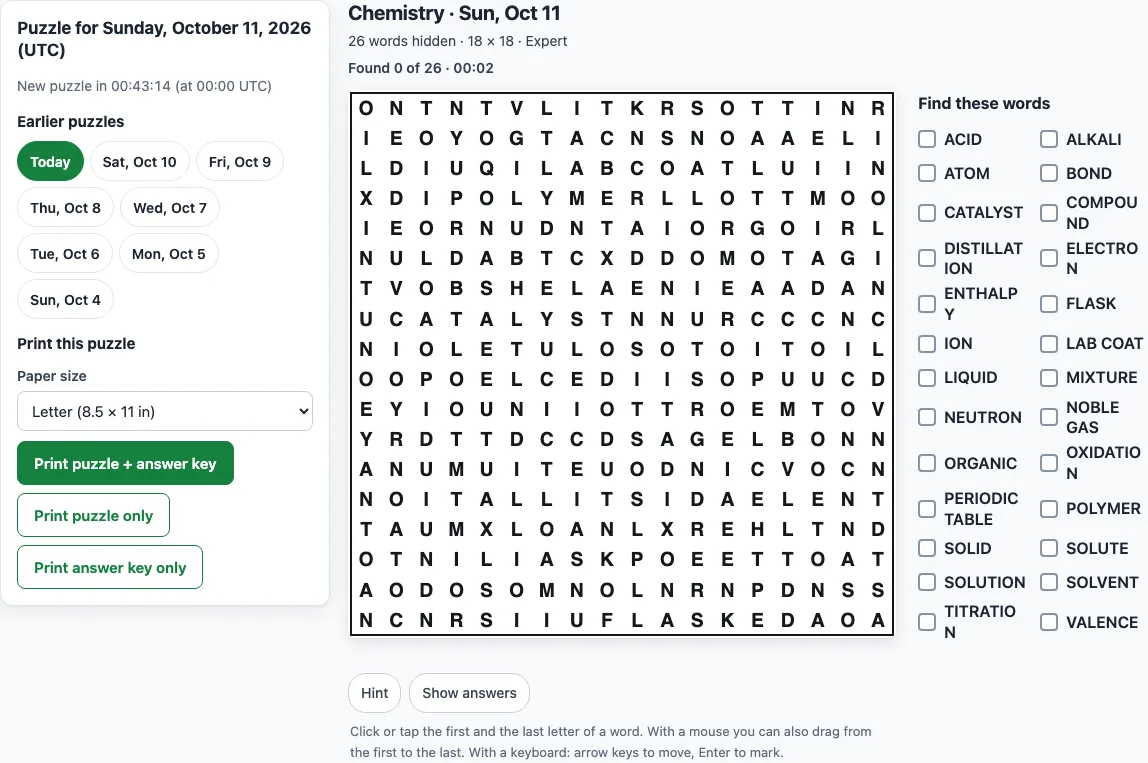
Today's word search, the same for everyone. Play it on screen or print it with the answer key, and catch up on the last 7 days.
Recent
Your last 10 settings, saved only in this browser. Nothing is uploaded.
How to play the daily word search
- Open the page. Today’s puzzle is shown with its topic, size and level, and a list called “Find these words”.
- Look for a word in the grid. Words can run in any direction the level allows.
- Click or tap the first letter of the word, then the last letter. With a mouse you can also drag across the letters.
- On a keyboard, use the arrow keys to move and press Enter or Space to mark a letter.
- A correct word gets a coloured outline, and its box in “Find these words” is ticked. A wrong pick shows “That is not one of the words. Try again.”
- Watch the status line, which shows “Found x of y” and a timer.
- If you are stuck, press “Hint” to make the first letter of an unfound word flash. Press “Show answers” to outline every word.
- When all the words are found, the page shows “Puzzle complete in mm:ss”. Press “Play the previous day” to open the day before.
Reloading the page continues your current puzzle. The browser saves one game at a time, so opening a different day replaces the saved progress of the day you were playing.
To print, pick Letter (8.5 × 11 in) or A4, then press “Print puzzle + answer key”, “Print puzzle only” or “Print answer key only”. To save a PDF, choose “Save as PDF” in the print window.
When does the daily word search change?
The puzzle changes at 00:00 UTC (midnight Coordinated Universal Time). The day is the UTC date, and a countdown on the page reads “New puzzle in hh:mm:ss (at 00:00 UTC)”, so you can see when the next one arrives in your own time. Size and difficulty depend on the UTC weekday:
- Monday: 12 × 12, Easy, 14 words
- Tuesday: 12 × 12, Medium, 14 words
- Wednesday and Thursday: 15 × 15, Medium, 18 words
- Friday: 15 × 15, Hard, 18 words
- Saturday: 18 × 18, Hard, 22 words
- Sunday: 18 × 18, Expert, 26 words
The week starts gently and ends with the hardest puzzle on Sunday, so Friday and Saturday are the days for a daily hard word search. The levels differ in the directions words can take. On Easy, words run left to right or top to bottom and never cross. Medium adds diagonals going down-right and up-right, with no backwards words, and words may cross where letters agree. Hard uses all eight directions, including backwards and upwards. Expert also uses all eight directions, but crossings are tried first and the filler letters come from the hidden words, so the whole grid looks alike.
How is the topic of the daily word search chosen?
The topic is one of 35 general topics, such as Birds, Space, Chemistry, Composers or Fruits. None is tied to a holiday or season. Each block of 35 days uses every topic once, in a shuffled order that is fixed in advance, and the same topic never appears two days in a row. The words are drawn from that topic’s word list, and every hidden word appears exactly once in the grid.
For example, Sunday 11 October 2026 (UTC) is Chemistry, 18 × 18, Expert, with 26 words from Acid to Valence. Liquid starts at row 3, column 7 and runs backwards, and Organic starts at row 4, column 17 and runs downwards. The next day is Music terms, 12 × 12, Easy, with 14 words.
How do I solve a daily word search faster?
Look for letters that stand out, such as Q, X, Z, J or K, and for double letters like OO, LL or SS. Find the longest words first. Take the first letter of a word and check its eight neighbours for the second letter. Cross words off as you find them, and on Hard and Expert remember to read backwards and upwards.
Frequently asked questions
Can I play yesterday’s daily word search?
Yes. Under “Earlier puzzles” there are links for Today and the previous 7 days, eight puzzles in all. You can also press “Play the previous day” after finishing a puzzle. Days older than 7 are not kept, and an address with an older or invalid date shows today’s puzzle instead.
Is there a printable daily word search with an answer key?
Yes. Choose Letter or A4, then press “Print puzzle + answer key”. The answer key is a second page with every word outlined. You can print any of the eight days in the archive.
Can I use the puzzles commercially or sell them on Amazon KDP or Etsy?
Yes. What you print is free to use for any purpose, including commercial use. It is royalty-free and needs no attribution, so you can use it in worksheets, newsletters, puzzle books on Amazon KDP, Etsy printables or classroom materials you sell. The only limit is that you may not copy the site or use its generator to build a competing service.
Is the daily word search free, and does it need an account?
Yes, it is free to play online. There is no sign-up and no download, and nothing you do is uploaded.
Is the daily puzzle the same for everyone?
Yes. The puzzle depends only on the UTC date, so every visitor on that date sees the same topic, grid and words. For a puzzle with your own words or settings, use the word search maker.
Related tools
- Word search maker: use it when you want your own words, a chosen topic, grid size or difficulty.
- Printable word search puzzles: use it when you need several copies with answer keys in one go.
- Word search online: use it when you want a random puzzle each time you press a button.
- Hard word search: use it when you want harder grids with words in all eight directions.
- Word search puzzles for adults: use it when you are choosing puzzles for grown-up solvers.
- Word search for kids: use it when you are choosing puzzles for children.
- Word search with answers: use it when you want puzzles that come with an answer key.
- Word search solver: use it when you are stuck on a grid and want help locating the words.