Easter Word Search
Easter eggs, bunnies and Holy Week words hidden in a grid, to print or play online.
An Easter word search is a grid of letters with Easter words hidden inside it, and this free tool makes a new one for you. It runs in your web browser, with no sign-up and no download.
The page opens on the Easter topic, which has 51 words, in a 15×15 grid set to Medium difficulty. You can also choose Easter (easy), a list of 32 short words for young children, or Spring, which has 50 words. Each puzzle is different, so you can make as many as you need.
The Easter list mixes egg hunt words like basket, jelly beans and hot cross buns with church calendar words like Lent, Holy Week and Good Friday. You can play the puzzle on screen or print it for a class, a family activity or an Easter event.
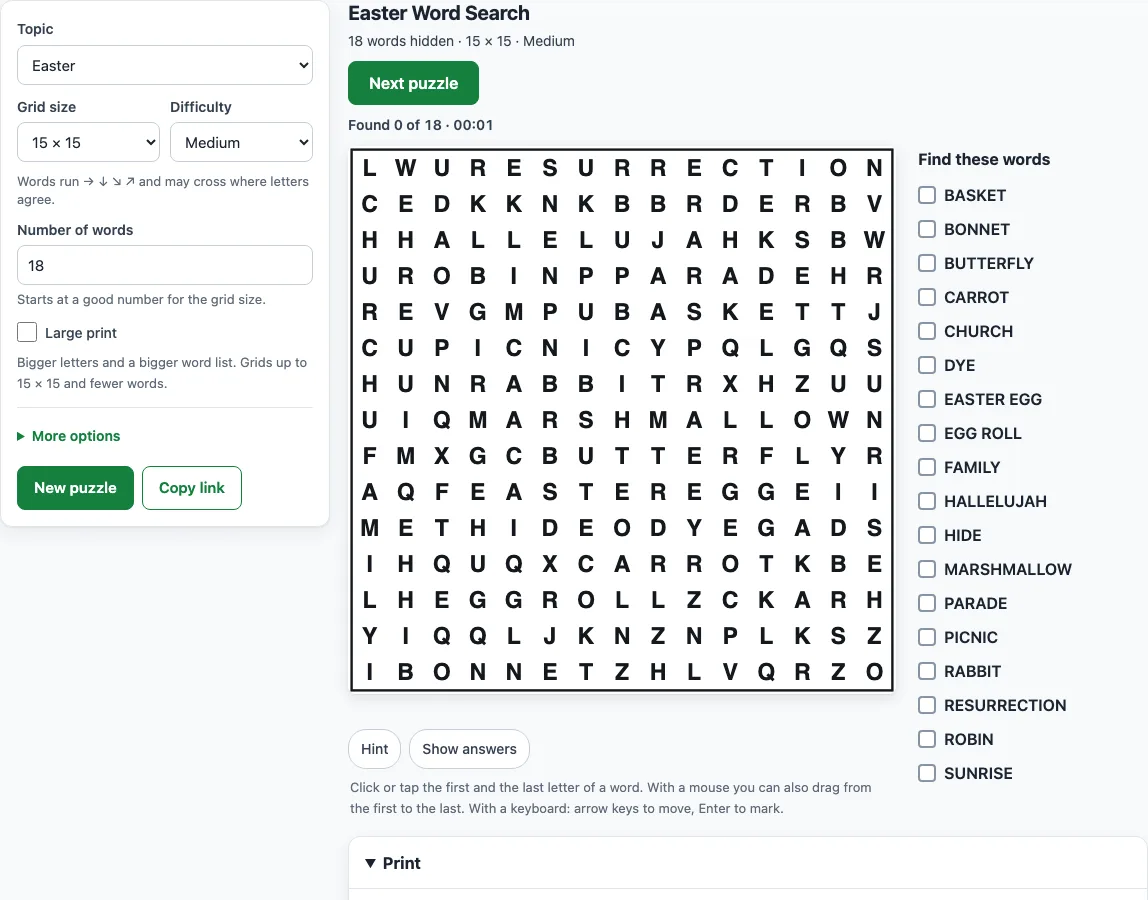
How to use the Easter word search
- Open the Topic menu and choose Easter, Easter (easy) or Spring. To use your own list, choose My own words and type it in.
- Set the Grid size, from 8×8 up to 30×30. The default is 15×15.
- Set the Number of words, from 4 to 60. Each grid size starts with a sensible number.
- Pick a Difficulty: Easy, Medium, Hard or Expert. Read the hint line under the levels to see which directions the words use.
- Click or tap the first letter of a word, then its last letter. With a mouse you can also drag across the letters.
- Watch the status line for “Found x of y” and the timer. Use Hint to flash the first letter of an unfound word, or Show answers to outline every word.
- When every word is found, the page shows “Puzzle complete in mm:ss”. Select Next puzzle for a new grid with the same settings.
To print, open the Print panel. You can set Copies (1 to 20, and each copy has a different arrangement), Paper size (Letter or A4) and Answer keys (Four per page, One per page, or One per page with word positions). Then choose Print puzzles + answer keys, Print puzzles only or Print answer keys only. To share the exact same puzzle, select Copy link.
The Easter sheets are free to use at home, in class or in products you sell, such as Etsy printables.
What words are in an Easter word search?
The default Easter list has 51 words that mix the egg hunt and spring side with the church calendar. The egg hunt side includes Easter egg, Easter bunny, Basket, Egg hunt, Jelly beans, Chocolate, Bonnet, Pastel, Tulip, Daffodil and Hot cross buns. The church calendar side includes Lent, Palm Sunday, Holy Week, Good Friday, Resurrection, Hallelujah and Sunrise.
The full lists:
Easter (51 words): Easter egg, Easter bunny, Basket, Egg hunt, Chick, Lamb, Jelly beans, Chocolate, Marshmallow, Candy, Bonnet, Parade, Pastel, Hot cross buns, Lily, Tulip, Daffodil, Blossom, Spring, Sunrise, Sunday, Brunch, Ham, Lent, Palm Sunday, Holy Week, Good Friday, Resurrection, Church, Cross, Hallelujah, Rejoice, Decorate, Dye, Paint, Hide, Grass, Ribbon, Carrot, Rabbit, Hatch, Nest, Duckling, Robin, Picnic, Garden, Butterfly, Family, Celebrate, Renewal, Egg roll.
Easter (easy) (32 words): Egg, Jelly, Bunny, Chick, Basket, Candy, Hunt, Hide, Spring, Lamb, Duck, Hop, Grass, Nest, Tulip, Lily, Pink, Bow, Paint, Dye, Hat, Ears, Tail, Carrot, Treat, Sweet, Hatch, Bonnet, Sunday, Easter, Flower, Rabbit.
An Easter word hunt is the same puzzle as a word search, also called a word find. The words are hidden in a grid of letters, and you find them by looking in every direction the puzzle allows. Spaces are removed in the grid, so PALM SUNDAY is hidden as PALMSUNDAY. In the worked example at /easter-word-search/?seed=demo1, that word starts in row 14, column 3 and runs diagonally up to the right.
The difficulty level sets the directions. On Easy, words run only left to right and top to bottom, and they never cross. Medium adds diagonals going down-right and up-right, and words may cross where their letters match. Hard allows all eight directions, including backwards. Expert uses all eight directions, tries crossings first, and builds the filler letters from the hidden words, so the whole grid looks alike.
Is there an easy Easter word search for kids?
Yes. Choose the Easter (easy) topic, which has 32 short words for young children, such as Egg, Jelly, Bunny, Chick, Basket, Hop, Carrot and Sunday. Then set the Difficulty to Easy. Words run only left to right and top to bottom, so children only need to look in two directions.
Smaller grids are easier to scan, so a 10×10 or 12×12 grid with a low number of words is a good start. Use these solving tips with children:
- Take the first letter of a word and check the neighbouring letters for its second letter.
- Find the longest words first, such as Basket or Bunny.
- Look for double letters, such as the LL in Jelly.
- Cross each word off as you find it, so the list gets shorter.
Frequently asked questions
Can I print easter word searches for a class?
Yes. Open the Print panel and set Copies to the number of students you need, from 1 to 20. Each copy has a different arrangement of the words, so students cannot copy from each other. Each puzzle prints on its own page with Name and Date lines.
Can I save it as a PDF?
Yes. Open the Print panel, choose your puzzles, then choose Save as PDF in the print window. You can then store the file or send it to someone.
Does it come with answers?
Yes. Choose Print puzzles + answer keys, or Print answer keys only. Answer keys come after the puzzles, with each word outlined, and you can print them four per page, one per page, or one per page with each word’s row, column and direction. On screen, select Show answers to outline every word.
Is an easter word hunt the same as an easter word search?
Yes. An Easter word hunt is a word search, which is also called a word find. The words are hidden in a grid of letters, and you find them by looking in each direction the puzzle allows.
Can I use my own Easter words?
Yes. Choose My own words in the Topic menu and type your list into the Your words box, one word per line or separated by commas or semicolons. The list can have up to 60 words. Words that are too long, too short or repeated are listed under Left out, with the reason. Your words stay in your browser.
Are Easter word searches free for commercial use, such as Etsy printables?
Yes. What you make is royalty-free for personal, classroom and commercial use, including Etsy printables, Teachers Pay Teachers, KDP activity books and print-on-demand products. The Easter lists are our own, no credit is required, and the only limit is copying the generator or site to run a competing service.
Related tools
- Spring word search: Use it when you want a puzzle about spring flowers, weather and garden words.
- Word search for kids: Use it for younger players who need easier grids and simpler word lists.
- St. Patrick’s Day word search: Use it for a March holiday puzzle with a similar format.
- Animal word search: Use it when you want a puzzle about animals, such as bunnies and chicks.
- Printable word search puzzles: Use it when you want puzzles ready to print for a class or event.
- Word search with answers: Use it when you need answer keys for teachers or group leaders.
- Word search maker: Use it to build a puzzle from any topic or your own word list.