Spring Word Search
Spring words hidden in a grid, from blossoms to the equinox, to print or play online.
A spring word search is a letter grid with spring-themed words hidden in it. You find each word by tracing it across, down, or diagonally. This spring word search maker builds one for you in your web browser, for free, with no sign-up.
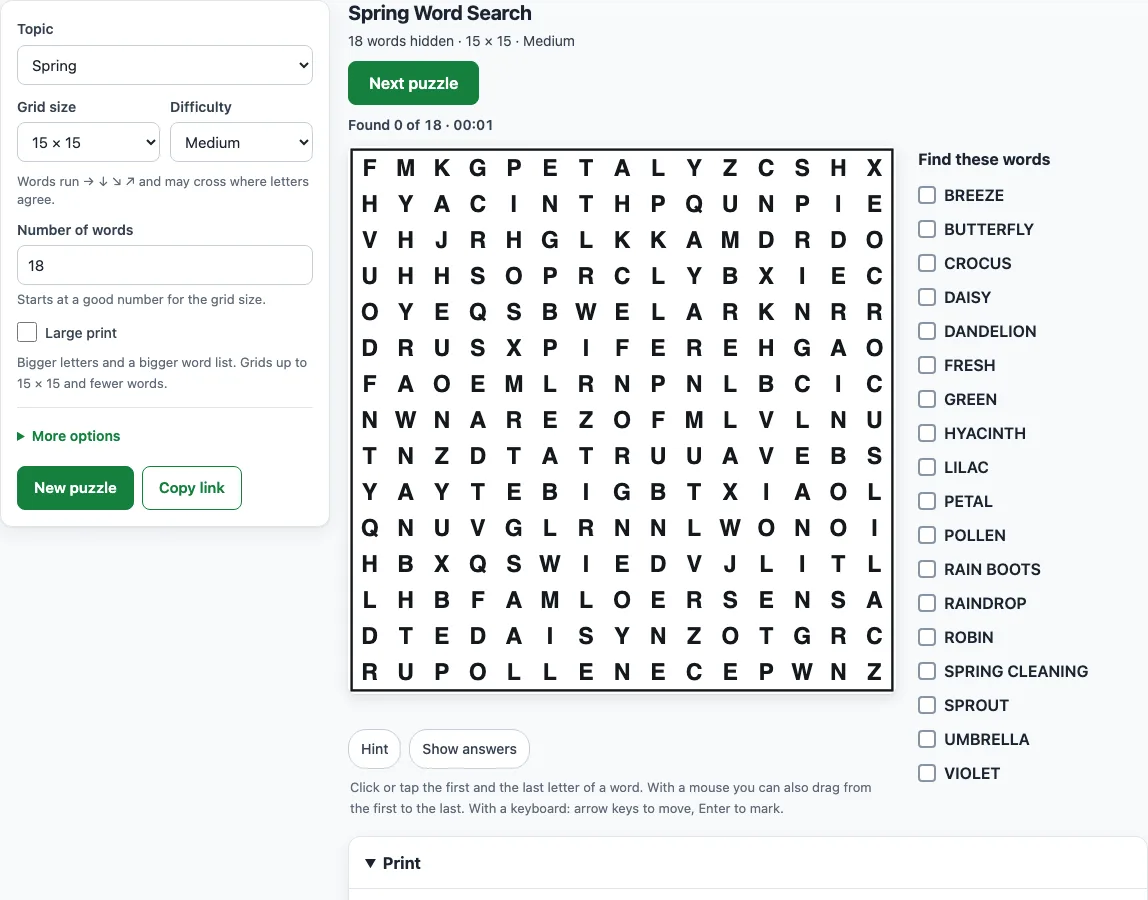
The tool opens on a Spring puzzle with 50 words to choose from, set to a 15×15 grid at Medium difficulty. You can play it on screen, or print it as a spring word search printable with an answer key for a class, a family activity, or a handout. Each new grid is a fresh arrangement, so you can make as many spring word puzzles as you need. The same page also offers a Spring (easy) list for young children, a Hard option for adults, and your own word lists.
Use the sheets at home, in class or in products you sell, such as spring activity printables.
How to make a spring word search
- Open the Topic menu and choose Spring for the standard list, Spring (easy) for young children, or My own words to type your own list.
- Set Grid size. The default is 15×15. Choose 8×8 or 10×10 for younger players.
- Set Difficulty to Easy, Medium, Hard or Expert. The hint line under the menu explains each level.
- Adjust Number of words if you want more or fewer. It starts at a suitable number for the grid size.
- Play on screen. Click or tap the first letter of a word, then its last letter. Use Hint if you are stuck, or Show answers to outline every word.
- Select Next puzzle or New puzzle for a new grid with the same settings.
- Open the Print panel, set Copies, Paper size and Answer keys, then press Print puzzles + answer keys.
For a springtime word search printable for a whole class, set Copies up to 20: every copy has a different arrangement, and copy 1 is the puzzle on your screen. To share the exact puzzle, press Copy link. The link opens the same grid again, so you can send it to a class or friend. To save a PDF, choose Save as PDF in the print window.
What words go in a spring word search?
A spring word search uses words linked to the season, such as Blossom, Daffodil, Tulip, Robin, Rainbow, Butterfly, Seedling, Magnolia and Equinox. The Spring list holds 50 words, and the default puzzle uses 18 of them, chosen at random for each new grid. Spring in the Northern Hemisphere runs from the March equinox, around March 20, to the June solstice, around June 21, which is why Equinox appears on the list.
The full lists:
Spring (50 words): Blossom, Daffodil, Tulip, Crocus, Robin, Rainbow, Raindrop, Puddle, Umbrella, Butterfly, Caterpillar, Seedling, Sprout, Garden, Planting, Rebirth, Equinox, Lamb, Chick, Bunny, Meadow, Showers, Warm, Breeze, Kite, Bud, Green, Fresh, Mud, Bees, Pollen, Lilac, Violet, Hyacinth, Cherry blossom, Nest, Spring cleaning, Birdsong, Rain boots, Greenhouse, Renewal, Thaw, Lawn, Hatching, Sunshine, Petal, Daisy, Dandelion, Iris, Magnolia.
Spring (easy) (35 words): Rain, Sun, Bud, Bloom, Flower, Tulip, Bee, Bird, Nest, Egg, Chick, Lamb, Bunny, Kite, Puddle, Mud, Boots, Worm, Seed, Grow, Plant, Green, Grass, Daisy, Frog, Duck, Robin, Warm, Wind, Cloud, Petal, Garden, Rainbow, Spring, Leaf.
The Spring (easy) list is shorter and simpler. It has 35 words of 3 to 8 letters, such as Rain, Bud, Bloom, Bee, Nest, Egg, Chick, Lamb, Kite and Frog. If you want your own spring words, choose My own words and type them in. Each word must be at least 2 letters, and the list can hold up to 60 words.
Can I make a hard spring word search?
Yes. Choose Hard or Expert difficulty and set the grid to 20×20 for a more challenging puzzle with more words. On Hard, words can run in all eight directions, including backwards, and they can cross each other. On Expert, the tool tries crossings first and builds the filler letters from the hidden words, so the whole grid looks alike and no area stands out.
Medium is a good step up from Easy. Words run left to right, top to bottom, and diagonally down or up to the right, but never backwards. Easy keeps every word in the left-to-right or top-to-bottom direction, and words never cross.
Some solving methods help on harder grids. Look for unusual letters such as Q, X, Z, J and K, or for double letters such as OO, LL and SS. Find the first letter of a word, then check all eight neighbouring squares for its second letter. Find the longest words first, and cross each one off as you go. On Hard and Expert, also read backwards and upwards.
Frequently asked questions
Is there an easy spring word search for kids?
Yes. Choose Spring (easy) from the Topic menu and set the difficulty to Easy. Its words are short, and in Easy puzzles every word runs left to right or top to bottom without crossing another word.
Can I print a spring word search with an answer key?
Yes. In the Print panel, choose Four per page, One per page or One per page with word positions for the answer keys, then press Print puzzles + answer keys. Answer keys print after the puzzles with each word outlined, or press Print answer keys only to print just the keys.
Is the spring word search free?
Yes. The tool runs in your web browser with no sign-up and no download, and nothing is uploaded. What you make is yours to use freely, including commercially; see the commercial-use question in this FAQ.
Can I make a spring break word search for a whole class?
Yes. Set Copies up to 20 in the Print panel. Every copy has a different arrangement, and when the topic has more words than fit the grid, each copy also uses a different set of words. Answer keys are included in the print run.
Can I use my own spring words?
Yes. Choose My own words in the Topic menu and type your list in the Your words box, one word per line or separated by commas or semicolons. Spaces and hyphens stay in the list but not in the grid, so “ice cream” is hidden as ICECREAM. Words that are too long, too short or repeated are listed under “Left out” with the reason.
Is a spring word search free for commercial use, like in an Etsy printable?
Yes. What you make is royalty-free for personal, classroom and commercial use, including Etsy printables, Teachers Pay Teachers, KDP activity books and print-on-demand products. The spring word lists are our own, no credit is required, and the only limit is copying the generator or site to run a competing service.
Related tools
- Easter word search: use it when your spring puzzle should focus on Easter words such as bunny and egg.
- Summer and spring word searches: use it if you want to move from spring themes into summer.
- Winter word search: use it for a seasonal puzzle about snow and cold weather.
- Word search for kids: use it to find puzzles sized and pitched for younger players.
- St. Patrick’s Day word search: use it for a March puzzle with a different theme.
- Printable word search puzzles: use it if you are planning a batch of paper puzzles for a class.
- Word search maker: use it to start from the main page and choose any topic or setting.