Word Search Online
Find the hidden words on screen: click or tap the first and last letter of each word, then press Next puzzle.
Recent
Your last 10 settings, saved only in this browser. Nothing is uploaded.
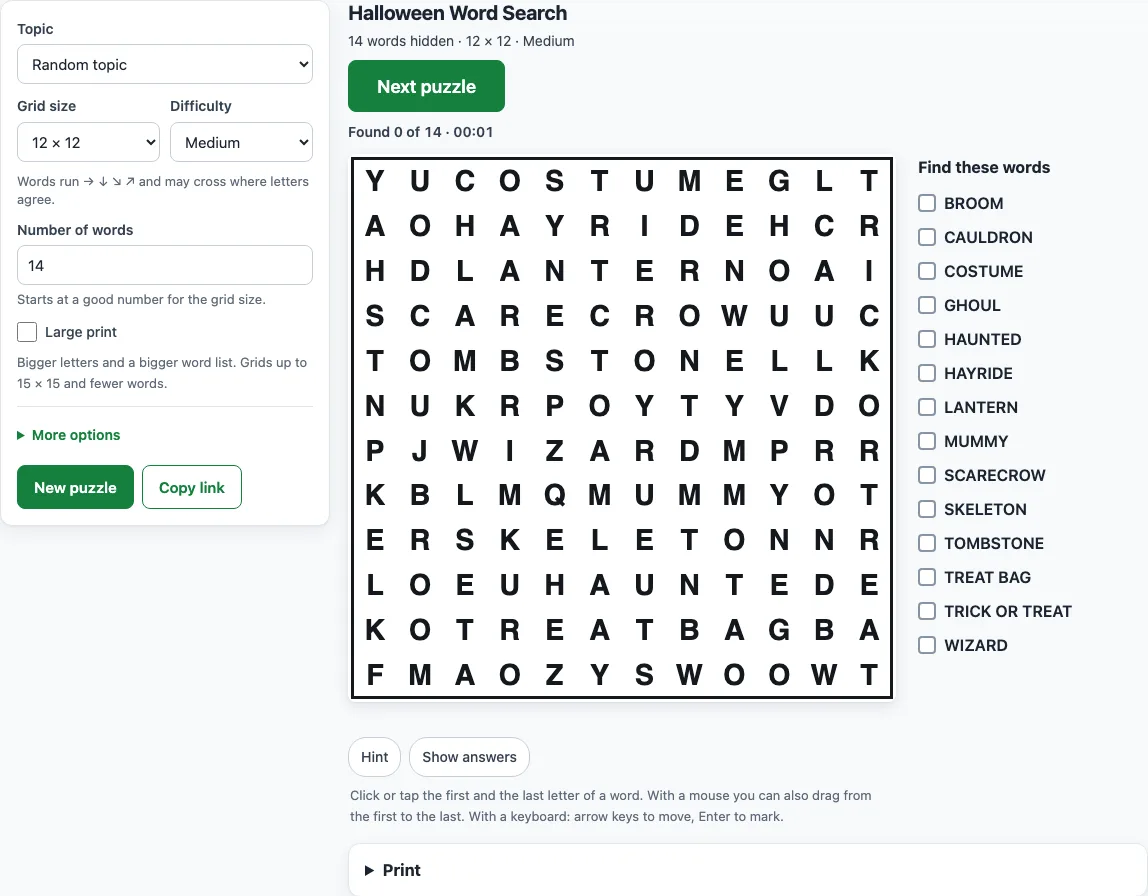
How to play word search online
- Look at the grid and the ‘Find these words’ list. Each word is hidden in a straight line, forwards or in other directions depending on the difficulty.
- Click or tap the first letter of a word, then click or tap its last letter. With a mouse you can also drag across the letters.
- Check the result. A found word gets a coloured outline and its box in ‘Find these words’ is ticked. A wrong pick shows “That is not one of the words. Try again.”
- Watch the status line, which shows ‘Found x of y’ and a timer.
- If you are stuck, press ‘Hint’ to make the first letter of an unfound word flash. Press ‘Show answers’ to outline every word.
- When all words are found, the page shows “Puzzle complete in mm:ss”. Press ‘Next puzzle’ for a new grid with the same settings.
Before you start, pick a topic from the ‘Topic’ menu, a grid size and a difficulty. On a keyboard, the arrow keys move and Enter or Space marks a letter. The ‘Print’ panel prints up to 20 copies with answer keys, and ‘Copy link’ saves an address that opens exactly the same puzzle again.
What are the word search directions?
Directions depend on the difficulty you choose. Easy puzzles use only left to right (→) and top to bottom (↓). Medium adds diagonals going down-right (↘) and up-right (↗), but words never run backwards. Hard uses all eight directions, including backwards and upward words. Expert also uses all eight directions, and its filler letters come from the hidden words, so the whole grid looks alike.
Example: one online puzzle, move by move
This is a real 10×10 Medium puzzle on the Space topic with 7 words (open it as a live puzzle). The list shows COMET, COSMOS, LAUNCH, LIGHT YEAR, MARS, METEOR and BLACK HOLE.
To find MARS, scan for the M that has an A diagonally beside it. The M is in row 8, column 2. Tap it, then tap the S in row 5, column 5, three squares up and to the right, and the word is outlined and ticked off. COSMOS is easier: it starts in row 4, column 1 and runs right. METEOR starts in row 5, column 1 and runs down. COMET runs right from row 8, column 5. LAUNCH runs right from row 2, column 3.
Medium puzzles never run backwards, so every word reads left to right or top to bottom, with up-right and down-right diagonals as well. In this puzzle BLACK HOLE (row 10, column 2) and LIGHT YEAR (row 9, column 2) both run up-right; the space in each name is left out of the grid, so you look for BLACKHOLE and LIGHTYEAR as one run of letters.
Why do words cross in a word search?
Words cross when two of them share a square. On Easy, words never cross. On Medium, they may cross where their letters agree. On Hard, crossing is allowed, and on Expert the generator tries crossings first. A shared letter helps you: once you find one word, check whether its crossing letter also belongs to another word on your list.
How do I solve a word search faster?
Start with the letters that are easiest to track. If a word contains Q, X, Z, J or K, scan for that letter first and check around it. Double letters such as OO, LL and SS are another good clue. Take the first letter of a word and check all eight neighbouring squares for its second letter. Then follow that line to see whether the word continues.
Find the longest words first, because they take the most space and are easiest to confirm. Cross each word off the list as you find it, so you do not search for it again. On Hard and Expert, remember to read backwards and upward as well as forwards.
Are the hidden words in a word search always unique?
Yes. Every hidden word appears exactly once in the grid. The generator rejects any filler letters that would spell a second copy of a word, so you will not find two matches for the same entry. The random filler is also checked so it never spells a rude word by accident.
A word that is part of a longer word only counts where it was placed. For example, if both CAT and CATERPILLAR are on the list, the CAT inside CATERPILLAR does not count; CAT is hidden once more on its own.
Which word search level suits adults?
Choose a topic from the For adults group, such as Countries, US states, World capitals, Cooking, Gardening, Travel or Big words, and set the difficulty to Hard. A smaller grid puts bigger letters on the screen, which helps when reading small type is tiring. This combination gives a more demanding word search game without making the letters hard to read.
Frequently asked questions
How do you play word search online?
Click or tap the first letter of a word, then click or tap its last letter. A found word is outlined and ticked off in the list. Use ‘Hint’ or ‘Show answers’ if you need help.
Is there a timer, and can I get a hint?
Yes to both. The status line shows a timer while you play, and when you find every word the page shows “Puzzle complete in mm:ss”. Press ‘Hint’ and the first letter of an unfound word flashes, which points you to a starting place. ‘Show answers’ outlines every word if you want the full solution.
Does it save my game?
Yes, the game is saved in your browser. If you reload the page, your puzzle continues where you left off. Your words stay in the browser and are not uploaded.
Can I play on a phone?
Yes. You can tap the first and last letter of each word on a phone or tablet. Choosing a smaller grid can make the letters larger on a small screen.
Can I play an online word search with my own words?
Yes. Choose ‘My own words’ in the Topic menu, type your list (up to 60 words) and the page builds a puzzle from it. Words that do not fit are listed under ‘Left out’ with the reason. ‘Copy link’ then saves the puzzle so a friend or class can open the same grid.
Is it free?
Yes. Word search online is free, needs no sign-up and has no download. It runs entirely in your web browser. What you print from it is free to use for any purpose, including commercial use; see the terms.
Is there an online word search for adults?
Yes. Pick a topic from the For adults group and set the difficulty to Hard. You can also choose a smaller grid for larger letters on screen.
Is this like word sleuth online or other word hunt games?
Yes. Word sleuth online, word hunt online and online word hunt games are other names for the same puzzle, and this one is free with no sign-up. It also works as an online word finder game: tap the first and last letter of each word. Free word hunt games for seniors work best with a 10×10 or 12×12 grid, where the letters are bigger on screen.
Related tools
- Word search maker - Use this when you want to create a custom puzzle with your own settings and words.
- Printable word search puzzles - Use this when you need paper copies with answer keys for a class or a family activity.
- Hard word search - Use this when you want all eight directions, including backwards words.
- Word search puzzles for adults - Use this when you want grown-up topics and a level that suits adult solvers.
- Word search for kids - Use this when you want simpler puzzles and easier directions for younger players.
- Animal word search - Use this when you want a puzzle built around pets, wildlife and farm animals.
- Halloween word search - Use this when you want a seasonal puzzle for October or a party activity.
- Word search solver: use it to find the words in a puzzle you are stuck on elsewhere.
- Daily word search: use it when you want a fresh puzzle each day, the same for everyone, with the last 7 days to catch up on.