Word Search Solver
Type or paste the letters of a word search and the words to find; every word is outlined in the grid, with where it starts.
The word search solver is a free tool that finds every word from your list inside a word search grid. You type or paste the letters of a puzzle you already have, along with the words to find, and the tool outlines each word in the grid and lists where it starts. It is free, needs no sign-up and uploads nothing.
Use it when you are stuck on a puzzle from a book, newspaper, worksheet or app, or when you want to check an answer. It handles grids up to 50 × 50 letters and word lists of up to 200 words. Results update as you type, so you can see progress without pressing anything. The same tool works as a word find solver, a word sleuth solver or a find a word puzzle solver: the puzzle is the same under every name, and the results list doubles as a word search answers finder.
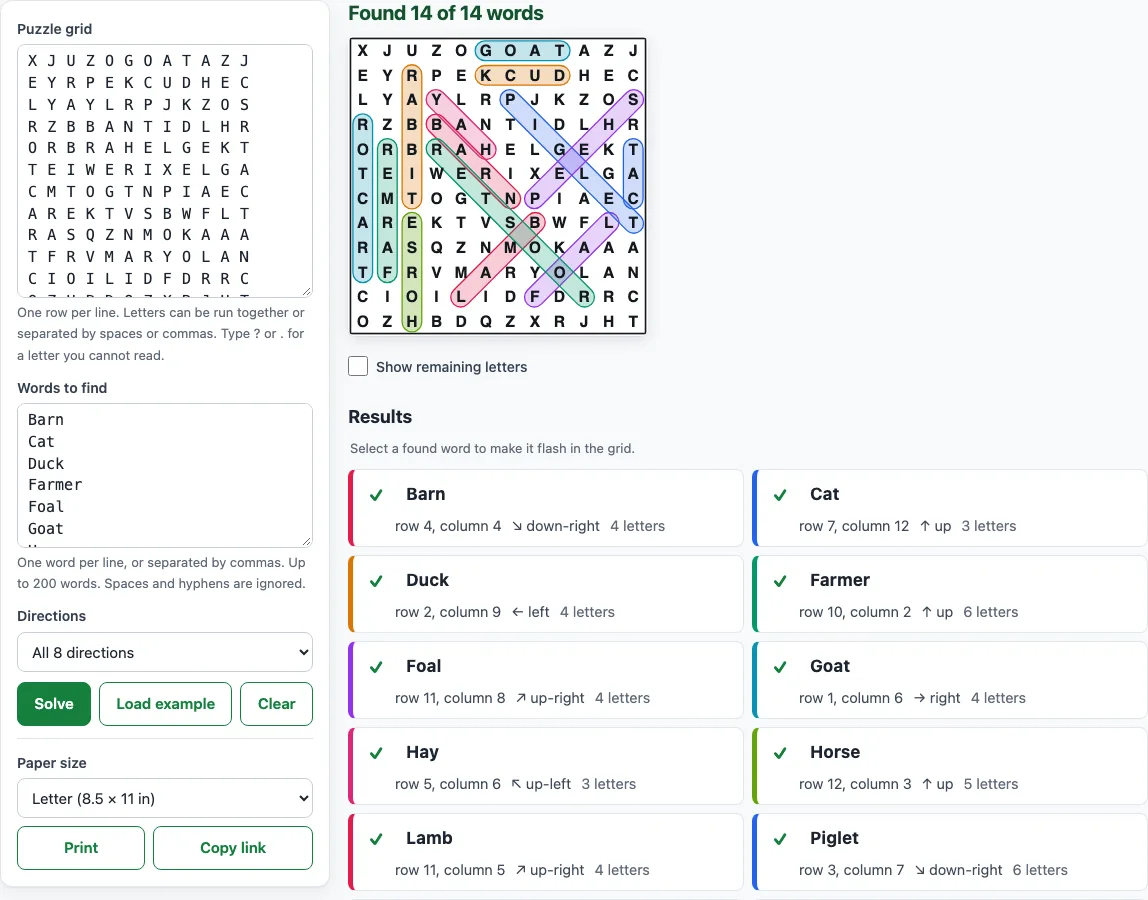
How to use the word search solver
- Type or paste the letters into the Puzzle grid box, one row per line. Letters can be run together (SOWP) or separated by spaces or commas (S O W P).
- Check for warnings. The tool flags any row that is not the same length as the others, and it lists any characters that are not letters.
- Type the words into the Words to find box, one word per line or separated by commas. Spaces and hyphens are ignored when matching.
- Open the Directions menu and choose a setting. The default, All 8 directions, checks across, down, the four diagonals, and backwards and upwards.
- Read the results. Each word shows a tick or a cross, the row and column of its first letter, its direction and its length.
- Hover over a word in the results to highlight it in the grid, or select it to make it flash.
- Tick Show remaining letters to grey out the letters used by found words. The leftover letters appear in reading order, which can reveal a hidden message.
The page opens with a real 12 × 12 practice puzzle already solved; Load example brings it back. Print gives you the solved grid and results list on one page, in Letter or A4 size. Copy link stores your grid, words and direction setting in the part of the link after #, so opening that link shows the same solved puzzle. Your last grid stays after a reload.
How does a word search solver work?
A word search solver checks every square of the grid as a possible first letter of each word. From each square, it reads outward in every allowed direction, one letter at a time, and stops as soon as a letter differs from the word. If the whole word matches, the position is reported.
In the tool’s own Load example puzzle (14 farm-animal words in a 12 × 12 Hard grid), all 14 words are found: Barn starts at row 4, column 4 and runs ↘ down-right, Goat at row 1, column 6 runs → right, Rabbit at row 2, column 3 runs ↓ down, Sheep at row 3, column 12 runs ↙ down-left, Tractor at row 10, column 1 runs ↑ up, and Rooster at row 11, column 10 runs ↖ up-left.
Every match is reported, not just the first one. This is why a word can appear in more than one place, and why a short word hidden inside a longer one shows up as an extra result. For example, CAT is found inside CATERPILLAR as well as wherever it appears on its own.
Does it find backwards and diagonal words?
Yes, on the default setting. The All 8 directions option checks across, down, the four diagonals, and backwards and upwards. Words that are written in reverse are common in printed puzzles, so this matters for finding them.
In the worked example, DUCK runs from right to left in row 2, starting at column 9. The results show it as “row 2, column 9, ← left”, which is a backwards word. If a word appears only in a direction you have switched off, the result tells you which setting to choose. Palindromes such as LEVEL are different: when they read the same forwards and backwards on the same squares, they count as one match.
What if I cannot read a letter?
Type ?, . or _ in place of the unclear letter. The tool treats that square as a wildcard that matches any letter. When a found word passes through it, the grid shows the letter that the word implies, in italic orange, so you can read the answer from the other letters.
Use this when a photocopy is smudged or a letter is hidden by a fold. Wildcards can produce more matches than a fully typed grid, so check the position and letter count of each result before you trust it.
Why does it say a word is not in the grid?
Usually one of three things is wrong. A letter may be mistyped in the grid or in the word list, so check the row where the word should appear. A direction may be switched off in the Directions menu. Or the word may not be in the puzzle at all, since printed puzzles sometimes contain errors.
Check the warnings first. A row of the wrong length shifts every letter after the gap, so a word can look missing when the problem is a single short row. Fix the grid, then solve again.
Frequently asked questions
How do I solve a word search with the solver?
Paste the grid into the Puzzle grid box and the words into the Words to find box. Results appear as you type, and each word shows its row, column and direction. The steps above cover each control.
Can it solve a word search from a photo or picture?
No. The tool has no photo or camera upload, so it is not a word search solver from an image. You type the letters yourself. A 15 × 15 grid takes a few minutes, and typing one row per line makes it easier to catch length warnings.
Is using a word search solver cheating?
Some people look for a word search finder cheat when they are stuck. Whether that is cheating depends on the purpose. If you are doing a puzzle for fun, a worksheet or a class task, check with your teacher or the rules of the activity. Using the solver to check answers you have already worked out, or to learn how the words are placed, is a different thing from copying a finished answer.
Is it free?
Yes. The tool is free, runs in your web browser, and needs no sign-up. Your grid and words are not uploaded.
Can I use it to check an answer key?
Yes. Enter the grid and the words, then compare the results with the answer key. Pay attention to the row and column numbers, since they show exactly where each word starts.
Why does a word show up in more than one place?
A word can appear more than once in a grid, or it can sit inside a longer word. The results list every place and show “found 2 times” when relevant, so you can see each occurrence.
Related tools
- Word search maker: Create a new puzzle with a printable answer key when you want your own grid rather than solving one.
- Word search with answers: Make puzzles whose answer key lists every word’s row, column and direction.
- Printable word search puzzles: Print packs of up to 20 different puzzles with answer keys.
- Word search online: Play a puzzle directly in your browser rather than solving one you already have.
- Hard word search: Make big Expert grids with backwards and crossing words.
- Large print word search: Use bigger letters for easier reading on screen or paper.
- Word search for kids: Find simpler puzzles suited to younger solvers.
- Word search puzzles for adults: Choose puzzles with longer words and denser grids for adult solvers.