Word Search With Answers
Make a word search and print it with an answer key that shows where every word starts and which way it runs.
Word Search with Answers is a free tool that builds a word search puzzle and prints it with its answer key, so you can make a printable word search with answers in a few clicks. It runs in your web browser, with no sign-up and no download. Your puzzles are not uploaded to a server.
Choose a topic from 73 ready-made word lists, or type your own words, and the tool draws the grid. Every puzzle comes with an answer grid where each hidden word is outlined. You can also pick a key layout that lists the row, column and direction of every word. The page opens on a sample Wild animals puzzle at 15×15, so you can see the result before you change anything. The same settings work for a word search and answers handout, a family game or a classroom task.
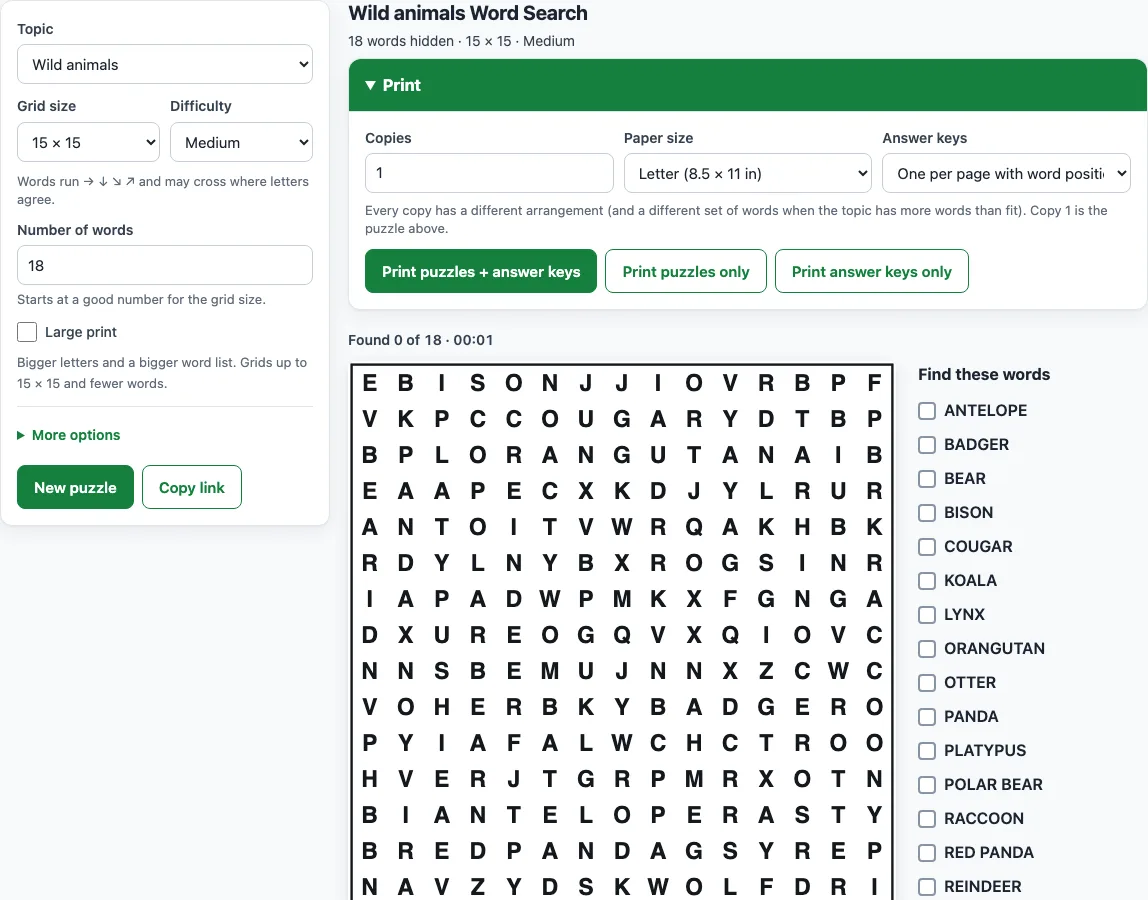
How to print a word search with answers
- Open the Topic menu and pick a list, such as Halloween or Thanksgiving. Choose My own words to type your own list, or Random topic for a surprise.
- Set the Grid size, for example 15×15, and the Number of words.
- Choose a Difficulty: Easy, Medium, Hard or Expert.
- Check the grid on screen. Click New puzzle for a new arrangement with the same settings.
- Open the Print panel. Set Copies (1 to 20) and Paper size (Letter or A4).
- Under Answer keys, choose Four per page, One per page or One per page with word positions.
- Click Print puzzles + answer keys. The answer keys print after the puzzles. To save a PDF, choose Save as PDF in the print window.
- To check answers on screen instead, press Show answers: every word is outlined in the grid, and Hint flashes the first letter of a word you have not found yet.
A Halloween word search with answers or a Thanksgiving word search with answers uses this same Print panel. Under More options, you can change the Letter case or hide the word list, and the Large print box gives bigger letters. Click Copy link to save every setting and the puzzle itself, so you can reopen it and print the key again later.
The puzzles and keys are free to use in class, at home or in products you sell, such as KDP puzzle books.
How do I get the answer key
The answer key is the same grid as your puzzle, with every hidden word outlined. The tool builds it from the puzzle’s own word placements, so it always matches the grid you printed. Each hidden word appears only once in the grid, so each outline marks exactly one answer.
You can choose from three layouts. Four per page fits four answer grids on one sheet, which saves paper. One per page gives you one large grid per sheet, which is easier to read. One per page with word positions adds a numbered list under the grid, so you can check each answer against its location. A word search answer key is generated automatically from the same seed as the puzzle, so you never have to mark the answers by hand, and a key printed later from a copied link still matches.
How do I read the word positions (row, column, direction)
Each entry gives the row and column of the word’s first letter. Row 1 is the top row of the grid, and column 1 is the leftmost column, so the count starts at the top-left corner. The arrow shows which way the rest of the word runs from that letter.
The arrows mean:
- → right
- ← left (backwards)
- ↓ down
- ↑ up
- ↘ down-right
- ↖ up-left
- ↗ up-right
- ↙ down-left
For a word that runs backwards (←), the first letter sits at the right-hand end of the word in the grid, and the word reads from right to left. Its position still uses the same row and column count.
Here is an example from the sample puzzle at /word-search-with-answers/?seed=demo1. The list reads:
- WARTHOG: row 1, column 3, ↘ down-right
- BEAVER: row 2, column 7, → right
- MOOSE: row 12, column 4, → right
To check WARTHOG, find row 1 and count to column 3. The letter there should be W, and the word should run diagonally down to the right from that square.
Frequently asked questions
Can I print only the answers?
Yes. In the Print panel, click Print answer keys only to print the keys without the puzzles. Set your Answer keys layout first, because the layout you choose applies to the printed keys.
Can I check my answers on screen?
Yes. Show answers outlines every word in the grid. Hint makes the first letter of a word you have not found flash, and found words are ticked in the Find these words list.
I have a word search from a book or another site. Where are its answers?
This tool cannot find answers for puzzles it did not make. Use the Word search solver instead. Type the grid and the word list, and it finds each word for you.
Black history month word search answers: where do I find them?
Use the Black History Month word search, or pick Black History Month in the Topic menu here. Every print comes with its answer key, and One per page with word positions lists the row, column and direction of each name.
Can I sell word searches with answer keys on Etsy or in a KDP book?
Yes. The puzzles and the answer keys you make are royalty-free for personal, classroom and commercial use, including KDP puzzle books, Etsy printables, Teachers Pay Teachers and print-on-demand products. No credit is required. The only limit is copying the generator or site to run a competing service.
Related tools
- Word search solver: use it when you have a puzzle from a book or worksheet and need its answers.
- Printable word search puzzles: print a pack of up to 20 different puzzles at once.
- Word search maker: use it to build a custom puzzle from any list of words.
- Christmas word search: use it for a holiday puzzle with a matching answer key.
- Halloween word search: use it for a spooky puzzle for a class or party.
- Thanksgiving word search: use it for a harvest-themed activity at home or school.
- Winter word search: use it for a cold-season puzzle with its answers.
- Word search for kids: use it when you want a simpler puzzle for younger players.
- Hard word search: use it when you want a bigger challenge with words in all directions.